1The short version
This guide assumes RehabKit → FitKit Pro. The files and QR codes are the same for every pairing, so most of it applies to other combinations too. Section 11 lists the differences.
| Your situation | Use | Why |
|---|---|---|
| Client is next to you, playlist has no media | Show QR Code (or AirDrop) | Nothing to accept; the client's camera does the work. |
| Client is next to you, playlist has videos or photos | Send Playlist by AirDrop | A QR code cannot carry media. A file can. |
| Client is somewhere else | Send Playlist by Messages, Email or Files | The file opens in FitKit Pro when they tap it. |
| Client does not have FitKit Pro yet | FitKit Pro App QR Code (in person) or Copy Install Link (remote) | Gets them to the App Store; then send the playlist. |
| Several clients in one sitting | Send to several clients now | The screen stays open and counts each send. |
| Same playlist, different people, different days | Sending to and Programs Sent | Records who got which version and shows who is behind. |
Two facts explain most behavior. (1) With RehabKit Pro, your client gets a signed, read-only program that runs free in FitKit Pro. Without it, the client gets an editable copy that needs their own FitKit access to run. (2) A version number only goes up when the playlist's content changes, and a client only ever moves to a higher version.
2The Send screen
In RehabKit, open the playlist, tap the Send or Receive Playlist button in the toolbar (the arrow-up-document icon), then choose Send. One screen covers every send and offers only what applies.
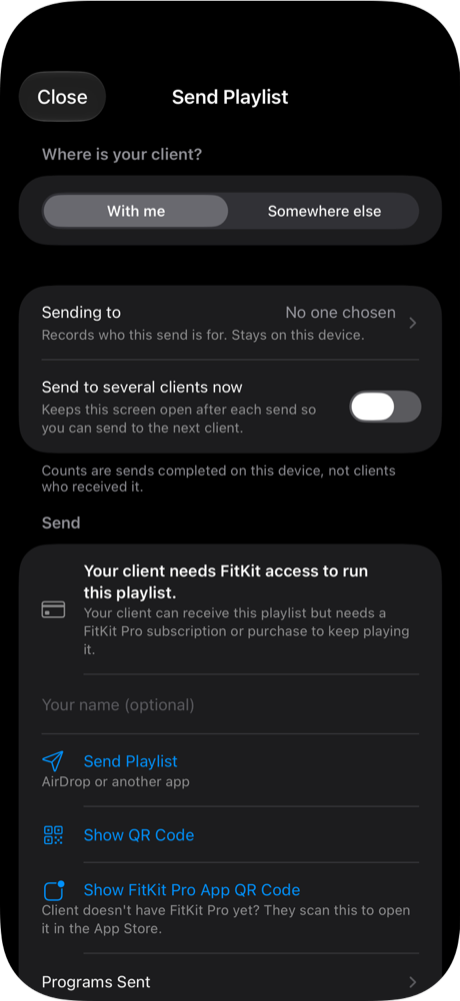
- Where is your client? With me or Somewhere else. Your last choice is remembered.
- Sending to: who this send is for, from your private client list. Optional.
- Send to several clients now: keeps the screen open after each send. Off whenever the screen opens.
- Status row: what the client will be able to do. Without Pro: "Your client needs FitKit access to run this playlist." With Pro: "Client playback included."
- Your name: shown to the client. Required for Pro sends.
- Send Playlist: builds the file and opens the share sheet.
- Show QR Code (With me only).
- Install help: FitKit Pro App QR Code (With me) or Copy Install Link (Somewhere else).
- Programs Sent and More Sharing Options (Copy Playlist Attachment, Save to Files) sit lower on the screen.
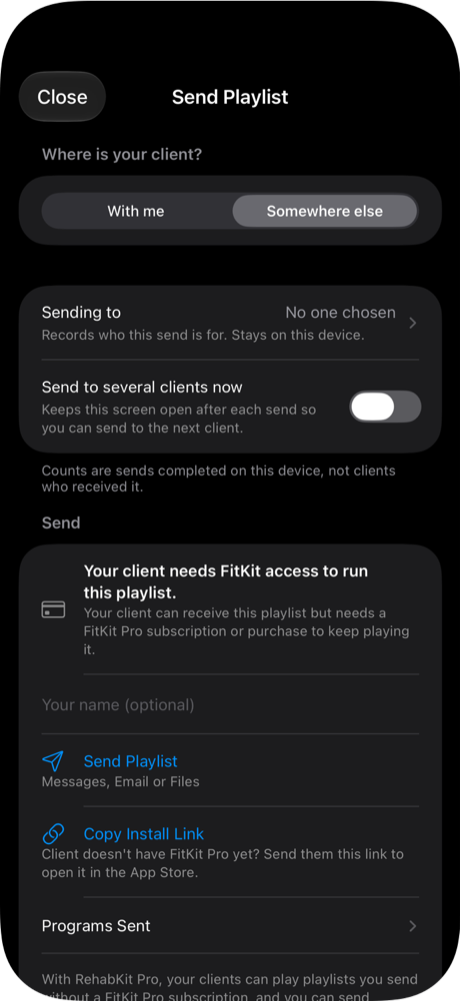
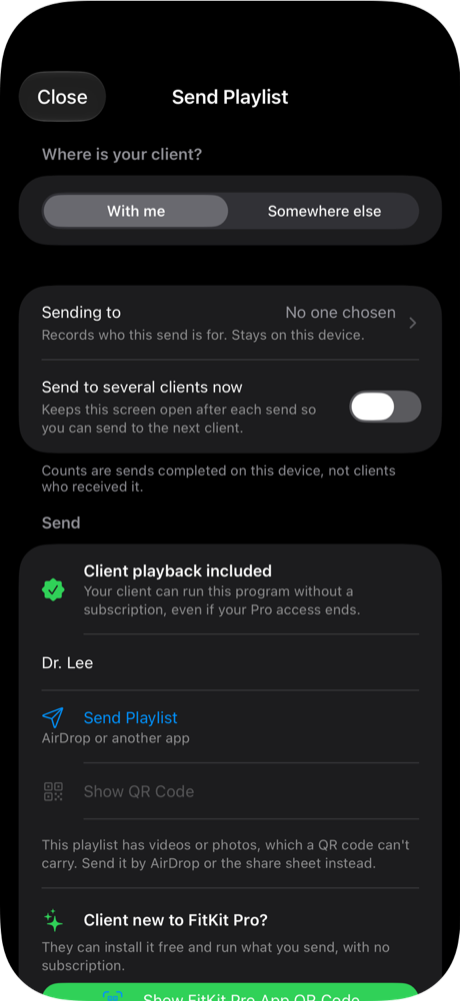
When an action is greyed out, the reason is printed right under it. Nothing fails silently after a tap.
Two ways to scan. iPhone Camera opens the selection webpage and needs internet to load it. After installing an app, return to that page and tap its Open button again. The in-app scanner works offline and also reads older raw QR codes. An installation QR only installs the app; it does not import a playlist. Only the receiving app verifies included playback.
3The ways to send
3.1 Send Playlist (the file)
Builds one .fitkitplaylist file and opens the iOS share sheet: AirDrop, Messages, Mail, Files, or any app that accepts files. When the client taps the file, it opens in FitKit Pro.
- Includes: steps, timings, notes, circuits, and any videos and photos (still encrypted; the key to open them is inside the same file, so treat the file as sensitive).
- Goes with it: a note with an install link, and the email subject "FitKit playlist: name".
- AirDrop can go to several people in one share sheet. That is one completed send.
- iOS reports a share complete when the sheet closes. A cancelled share counts nothing and uses up no version.
- If both apps are on the receiving phone, iOS opens the file with FitKit Pro by default.
3.2 Show QR Code (With me only)
A code the client scans. No file transfer, and the only in-person route that works without AirDrop.
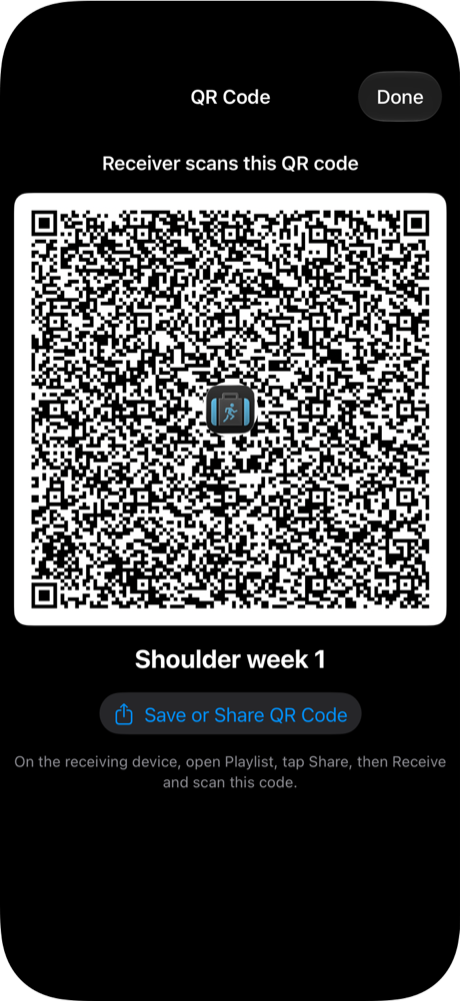
- No videos or photos. A ordinary share says so on screen; a Pro send disables the row.
- Size limit. A Pro code is capped at 1,370 bytes. Too large shows "too large for a reliable QR code".
- Brightness. Full brightness and no auto-lock while the sheet is open; both restored when you close it.
- Save or Share QR Code exports the image for a handout or message.
- The client scans with the iPhone Camera (link form opens an import page that offers FitKit Pro) or inside FitKit Pro with Scan with Camera, which supports pinch-to-zoom and lens buttons for a code across a room.
Two shapes of code exist: a bare v3:… text code and a link, https://rehabkit.app/import/#…. One Info.plist setting (PlaylistImportPageURL) chooses which RehabKit makes. See section 10 for what an older FitKit Pro can read.
3.3 Copy Playlist Attachment and Save to Files
Under More Sharing Options. Same file as Send Playlist.
- Copy puts the file on the clipboard to paste into an app that takes attachments. If an email app refuses the paste, use Save to Files and attach from there.
- Save to Files writes
<name>.fitkitplaylistto Files or iCloud Drive. - Both count as a delivered send when they finish.
3.4 A client who does not have FitKit Pro yet
- Show FitKit Pro App QR Code (With me): opens FitKit Pro's App Store page on the client's phone.
- Copy Install Link (Somewhere else): copies a link to paste in a message. A phone cannot scan its own screen, so this replaces the QR code.
- A tip reminds you after your first delivered send, until you use install help once.
3.5 What the client does in FitKit Pro
Tapping a file opens it in FitKit Pro and imports it, even on first launch (it waits until onboarding is done). For codes, the client uses Receive Playlist: the Send or Receive Playlist toolbar button, then Receive.
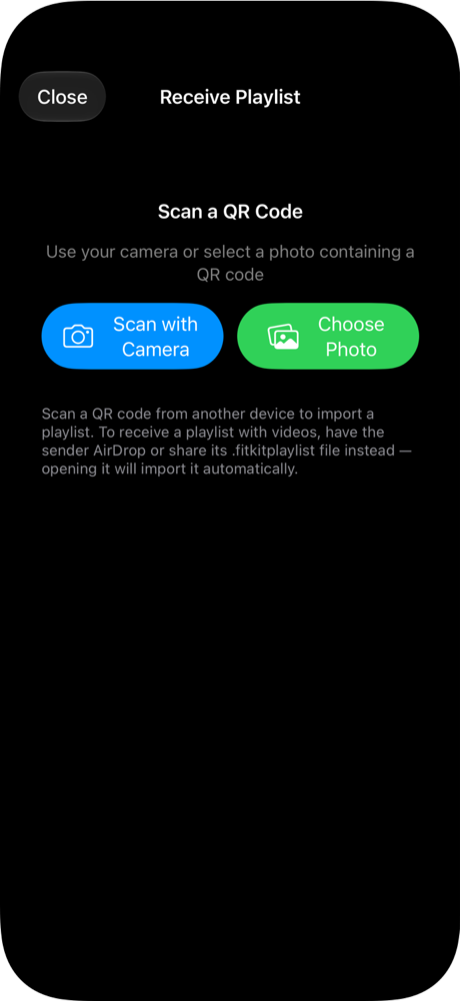
- Scan with Camera: pinch to zoom or tap a lens button (0.5×, 1×, 2×, 5×, 10× as the camera allows).
- Choose Photo: reads a QR code from a saved image or screenshot.
- For a playlist with videos, the screen tells the client to ask for the file instead.
4With me and Somewhere else
This control only changes which actions are offered. The package is the same either way.
| Action | With me | Somewhere else |
|---|---|---|
| Send Playlist subtitle | "AirDrop or another app" | "Messages, Email or Files" |
| Show QR Code | Offered | Hidden |
| Install help | Show FitKit Pro App QR Code | Copy Install Link |
| Footer note | AirDrop and the QR code go straight to your client. | Messages, Email and Files pass the file through that service; groups and To: recipients see each other. |
| Copy, Save to Files | Offered | Offered |
5Ordinary shares and playback-included programs
RehabKit picks the kind from your RehabKit Pro state when you tap an action. You never choose it.
| Without RehabKit Pro | With RehabKit Pro Pro | |
|---|---|---|
| What the client gets | An editable copy | A signed, read-only program |
| Client can edit it? | Yes | No |
| Client needs FitKit access to run it? | Yes: their own trial, subscription or purchase | No. It runs free in FitKit Pro, even if your Pro later ends |
| Your name | Optional | Required (clients see it) |
| Videos and photos | In the file; left out of QR codes | In the file; QR disabled for playlists with media |
| Main button | Always Send Playlist | Send Playlist, then Send Version N Again or Send Update (Version N+1) |
| Recall | Not possible. There is no server. | |
| If signing fails | The file still goes out | The send stops. It never falls back to a ordinary package |
Your signing key. It is kept in iCloud Keychain, so a restored or new device signs the same way. If you turn iCloud Keychain off or sign in with a different Apple Account, clients who already have your programs will not accept updates from the new key.
6What the client sees in FitKit Pro
6.1 A Pro program
| Situation | What the client sees |
|---|---|
| First time | "Add program from sender?" "name will be added to Playlists. You can run it, but it can't be edited." Add Program |
| Higher version of a program they have | "Update program from sender?" "name will be updated to version N. Your history stays." Update Program |
| They already have an editable copy of it | Replace with Clinician Program or Keep Both |
| Same version | "You already have this program (version N)." |
| Older version | "This file is an older version (X) than the one you have (Y), so it was not added." |
| Same name, different sender | "…was sent by a different person, so it was not added." A sender ID appears if two senders share a name. |
| Sender blocked | "This program can't be added because its sender has been blocked." |
| File changed after sending | "This file could not be verified. It may have been changed after it was sent, so it was not added." |
| FitKit Pro too old | "This file needs a newer version of the app. Update the app and open it again." |
After an update, an "Updated by your therapist" banner shows until dismissed.
6.2 A ordinary playlist
| Situation | What happens |
|---|---|
| First time | Imported as a new editable playlist; the sender is remembered. |
| Newer version, client has not edited their copy | Updated in place: "name was updated to version N." |
| Newer version, client edited their copy | "Update available… Replace your copy with the new version, or keep both?" Replace My Copy, Keep Both, Cancel. An edited copy is never overwritten silently. |
| Same or older version | "You already have this playlist (version N)." or "This file is an older version… so it was not added." |
| Opened from a link (Camera → import page → app) | "Add this playlist?" with the name, then Add Playlist. |
A ordinary playlist needs the client's own FitKit access to run. They can receive and open it, but once their trial ends they need a subscription or purchase to keep playing it. A Pro program does not.
7Versions and updates
Every playlist you send becomes a program with one stable identity and a version number. That is what lets a later send update a client's copy instead of creating a duplicate.
- With Pro: the button goes Send Playlist → Send Version N Again (unchanged) → Send Update (Version N+1) (after an edit). Repeating never bumps the version twice.
- Without Pro: the version moves automatically when content changes. The button always reads Send Playlist.
- When the playlist changed since your last send, the screen says: "Clients who already have an earlier version are not updated until you send to them again."
- To send a client-specific variation without touching the original program's clients, use Send as a New Program (section 8).
8Several clients
| Several people now, one sitting | Same playlist to different people later | |
|---|---|---|
| Use | Send to several clients now on | Leave the switch off |
| Screen after a send | Stays open: "Sent (N so far this visit)" | Closes, as always |
| Next client | Tap Send to Another Client | Open Send again, or use Programs Sent |
| Who it was for | Pick in Sending to each time; clears after each send | Pick in Sending to, or Send Update from Programs Sent |
8.1 Send to several clients now
- The switch is off whenever the screen opens, so one-to-one sending is never surprised.
- After a share, export, copy or QR display, a banner shows the running count.
- Send to Another Client reopens the share sheet and reuses the built package, so a large file is not rebuilt each time. It is rebuilt only if the playlist, media, name, plan, key or version changes.
- The count is sends completed on this device, not clients who received it.
8.2 Sending to
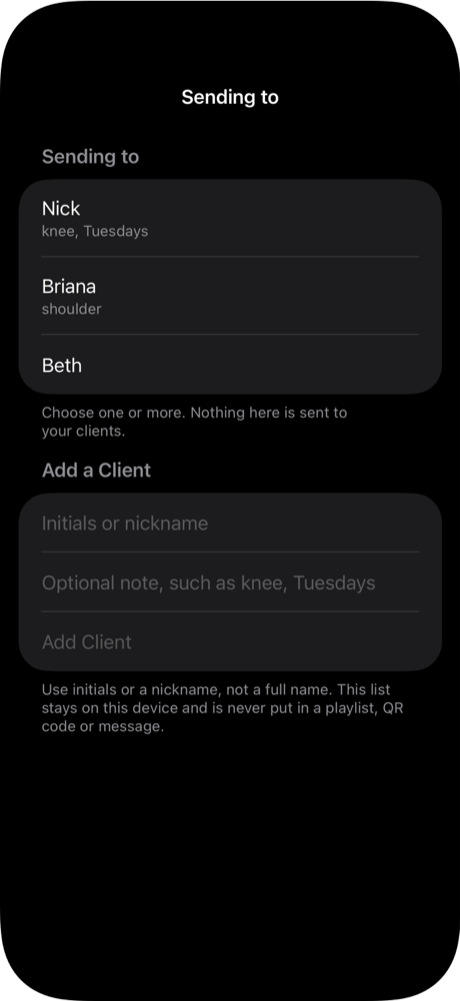
- Optional. A client is a short label (initials or nickname) and an optional note like "knee, Tuesdays". Do not use full names.
- Recorded only when a send completes. A cancelled share records nothing.
- One send is recorded for everyone you picked. Pick Nick, Briana and Beth, make one share, and all three are recorded. To record them separately, pick one at a time.
8.3 Programs Sent and Clients
Programs Sent is on the Send screen. It never leaves your device: not in a package, QR code or message, and not synced to iCloud.
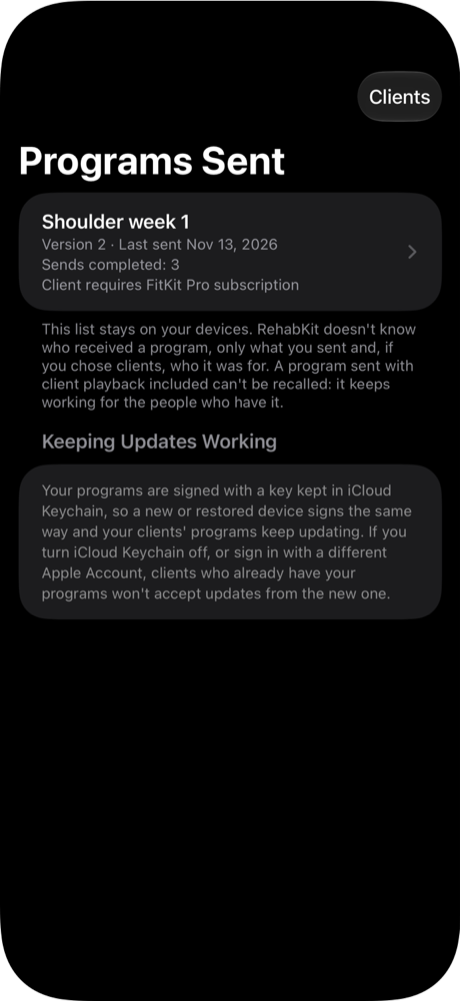
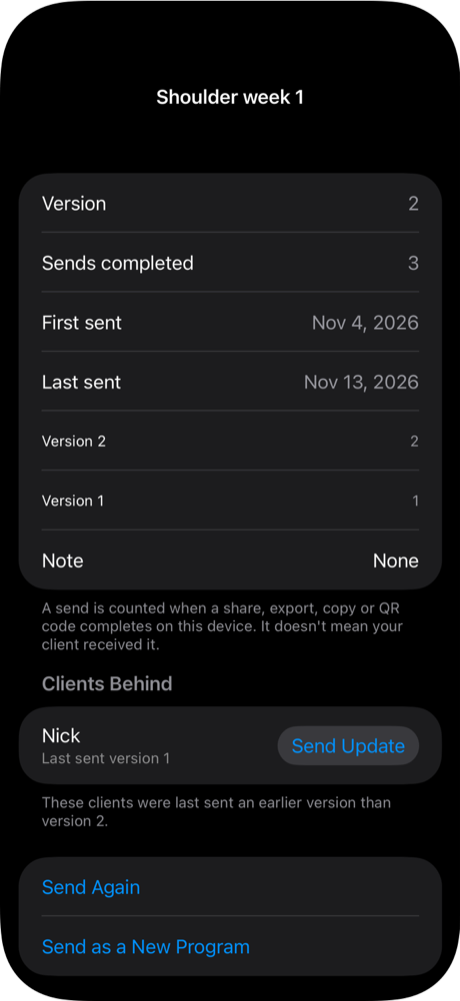
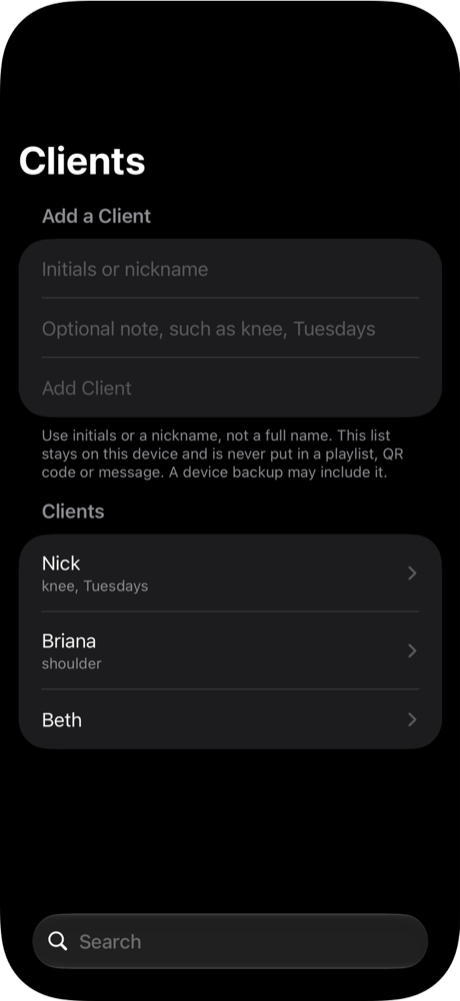
- Clients Behind: clients last sent an older version. Send Update opens Send with that client already chosen.
- Send Again reopens Send. Send as a New Program copies the playlist and sends it as its own program; the original and its clients are untouched. Videos and photos are not copied.
- Recent Sends: the last 50, newest first, with the clients each was for; a deleted client reads "Removed client".
- Clients: up to 200; labels 40 characters, notes 80. Archive hides someone from the picker but keeps their name in history.
"Last sent" is not "has". These screens say what was sent. The app cannot know a client received, installed or opened anything.
9Privacy and safety
Group messages and email expose recipients. In a group Messages thread, or an email with several people in To, everyone sees who else received it. Send separately when that matters. Do not rely on BCC: in one test recipients could still see each other, and the cause is not yet explained.
- Never put a client's name in the playlist. It travels in the file or code and cannot be recalled.
- The file is the sensitive item. The key to the encrypted videos and photos is inside it.
- A Pro program keeps working for the client after your Pro access ends, and cannot be recalled. Sending to many multiplies that.
- Your client list is device-only. Labels and notes are never added to a package, QR code, message, file name or iCloud sync. A device backup may include them.
- The import page holds the playlist after the
#in the link, which browsers do not send to a server. The page checks only the shape; FitKit Pro decodes and verifies the playlist.
10Clients on an older FitKit Pro
Your clients may not have updated. Compared with the released FitKit Pro 3.7.2:
| What you send from the current RehabKit | Client on FitKit Pro 3.7.2 |
|---|---|
| Ordinary playlist file | Opens. The extra signed-source key in the file is ignored. |
| Ordinary QR code, bare text form | Scans in the app. |
| Ordinary QR code, link form | Fails in the in-app scanner; that version does not read links. |
| Pro file | Refused: "requires a newer version of the app". By design, so an old app never opens a read-only program as editable. |
| Pro QR code | Not readable. |
| Keep-sending, client list, Programs Sent | Not affected; they live on your device. |
To keep QR codes readable for everyone for now, the link wrapper can be switched off by emptying PlaylistImportPageURL in both apps' Info.plist. Codes then return to the bare text form. The cost: the iPhone Camera route to the import page goes away until older versions fade out. Pro codes still need the current FitKit Pro either way.
11Other transfers
The Send and Receive screens, file type and QR formats are shared by both apps, so any pairing works. What changes:
| Pairing | Notes |
|---|---|
| RehabKit → RehabKit | Same file and codes. A Pro program opens read-only; a program signed by your own key offers an editable copy instead ("Add an editable copy of your own playlist?"). If FitKit Pro is also installed on the receiving phone, iOS opens files with FitKit Pro by default and lists RehabKit in the share sheet. |
| FitKit Pro → FitKit Pro or → RehabKit | Sends the ordinary kind only: FitKit Pro never signs, so there are no Pro rows, no status row, no name field, no install-link note with the share, and no Sending to, Programs Sent or Clients. The Send to several clients now switch and banner still work. Updates in place require a RehabKit sender. |
| Anything → an older app | See section 10. |
12Troubleshooting
- The QR code option is greyed out.
- Read the line under it. Usually the playlist has a video or photo, or is too large. Send the file instead. For a Pro send it can also mean your name is missing.
- My client scanned the code but nothing was added.
- If their FitKit Pro is old, the link form will not read, and a Pro code needs the current version (section 10).
- My client says "needs a newer version of the app".
- You sent a Pro program to an older FitKit Pro. Ask them to update, then send again.
- "You already have this playlist" or "already up to date".
- They hold this version. If you edited the playlist and expect an update, check the edit saved, then send again; a new version is created only when content changed.
- "Update available: Replace My Copy or Keep Both" appeared.
- The client edited their copy before the update arrived. Replace discards their edits; Keep Both keeps both.
- The file opened in RehabKit, not FitKit Pro (or the reverse).
- When both apps are installed, iOS opens files with FitKit Pro by default. The other app is in the share sheet's list.
- A client with no FitKit Pro sees nothing open.
- Send the install link or show the App Store QR code first, then send the playlist.
- A Pro send fails with "could not be signed or packaged".
- The app never falls back to a ordinary package. Check your name is filled in and iCloud Keychain is on, then try again.
- The count looks wrong.
- A count is completed shares on this device. One AirDrop to several people counts once. A QR counts when shown. A cancelled share counts zero.
13Glossary
| Term | Meaning |
|---|---|
| Program | A playlist you have sent, with a stable identity and a version number. |
| Version | Goes up when the playlist's content changes. A client only moves to a higher version. |
| Ordinary share | The editable copy. The client needs FitKit access to run it. |
| Pro send / playback included | A signed, read-only program the client runs free in FitKit Pro. Needs RehabKit Pro. |
| Signed | Marked with your private key so the client's app can tell it came from you and was not changed. |
.fitkitplaylist | The playlist file: one flat file, including any encrypted videos and photos. |
| Bare code / link code | The two shapes of a QR code (section 3.2). |
| Clients Behind | Clients whose last-sent version is older than the program's current one. |
| Sent | A share, export, copy or QR display completed on your device. It does not mean received. |
Your client can follow the client guide on fitkitpro.app, which shows the same screens from the receiving side. Short step-by-step help is also in the app (Send, Receive).